So in class this week were given the following problem to solve:
“Write an application that displays the following patterns separately, one below the other. Use for loops to generate the patterns. All asterisks (*) should be printed by a single statement of the form
Console.Write( "*" );which causes the asterisks to print side by side. A statement of the formConsole.WriteLine();can be used to move to the next line. A statement of the formConsole.Write( " " );can be used to display a space for the last two patterns. There should be no other output statements in the application. [Hint: the last two patterns require that each line begin with an appropriate number of blank spaces.]”
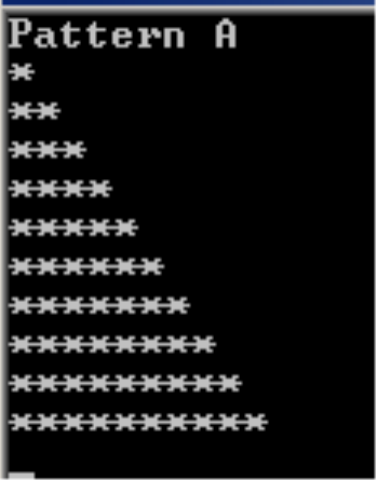

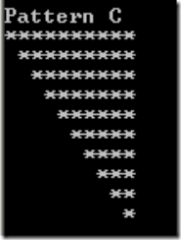
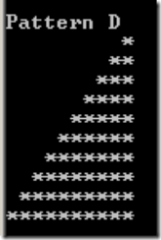
Here is my solution:
public static void Main()
{
    OutputAC(delegate(Int32 xAxis, Int32 i) { return ( xAxis < i + 1 ); } );
    OutputBD(delegate(Int32 xAxis, Int32 i) { return ( xAxis < i ); } );
    OutputAC(delegate(Int32 xAxis, Int32 i) { return ( xAxis > = i ); } );
    OutputBD(delegate(Int32 xAxis, Int32 i) { return ( i <= xAxis + 1 ); } );
    Console.ReadLine();
}

private delegate Boolean CheckCondition(Int32 xAxis, Int32 charactersPerRow);

private static void OutputAC(CheckCondition condition)
{
    Int32 charactersPerRow = 0;
    // loop through the y axis from row 0 to 10
    for ( int yAxis = 0; yAxis < 10; yAxis++ )
    {
        // loop through x axis from column 0 to 10 for each row.
        for ( int xAxis = 0; xAxis < 10; xAxis++ )
        {
            // write the character for the current position
            Console.Write( condition( xAxis, charactersPerRow ) ? "*" : " " );
        }
        ++charactersPerRow;
        Console.WriteLine( );
    }
}

private static void OutputBD( CheckCondition condition )
{
    Int32 charactersPerRow = 10;
    for ( int yAxis = 0; yAxis < 10; yAxis++ )
    {
        for ( int xAxis = 0; xAxis < 10; xAxis++ )
        {
            Console.Write( condition( xAxis, charactersPerRow ) ? "*" : " " );
        }
        --charactersPerRow;
        Console.WriteLine( );
    }
}