RabbitMQ
To get a glimpse into what is happening in your rabbit server there are a couple of ways to see. You can use the rabbitmq_management plugin or use rabbitmqctl list_queues.
To enable the management plugin:
$ rabbitmq-plugins enable rabbitmq_management
Then start the rabbit server.
$ rabbitmq-server
Then visit localhost:15672 and use the username: guest and password: guest to log in.
The management dashboard gives you a lot of information on the different queues, exchanges and a lot of other information.
To list out the queues from the command line you can run:
  λ rabbitmqctl list_queues
  Listing queues ...
  hello   0
  ...done.
In the above example, I have one queue named “hello” with 0 messages.
When sending message through rabbit you can send messages directly to a single queue. This type of setup is usually good for when you have a series of worker processes that are pulling messages off of a single queue to process.
In the case when you want to publish a single message and have it broadcasted to multiple subscribers, you want to use an exchange.
When a message is published to an exchange, the exchange delivers the message to multiple queues. Different types of exchanges deliver messages to queues in different ways.
Exchange
There are a few built in exchanges that you can use out of the box. They are:
- Direct
- Topic
- Headers
- Fanout
To list out all the exchanges on the server:
  λ rabbitmqctl list_exchanges
  Listing exchanges ...
          direct
          amq.direct      direct
          amq.fanout      fanout
          amq.headers     headers
          amq.match       headers
          amq.rabbitmq.log        topic
          amq.rabbitmq.trace      topic
          amq.topic       topic
          ...done.
Fanout Exchange
A fanout exchange delivers a message to all the queues that it knows about. More info here.
Direct Exchange
A direct exchange delivers messages to the queue who’s routing key exactly matches the routing key of the message.
Topic Exchange
A topic exchange operates like a direct exchange. It routes messages to queues that are bound to a specify routing key. The difference is the use pattern matching in the routing key.
Routing keys can accept patterns like “*” to substitute exactly one word. Or “#” to substitute zero or more words.
Routing keys are a series of words delimited by a “.”
E.g.
  "countries.canada.alberta"
  "countries.canada.\*"
  "countries.canada.#"
Bindings
Bindings are used to bind a queue to an exchange. This tells the exchange to add messages to a specific queue when they are received by the exchange.
“This queue is interested in messages from this exchange.”
To list all bindings:
  λ rabbitmqctl list_bindings
  Listing bindings ...
          exchange        hello   queue   hello   []
          exchange        task_queue      queue   task_queue []
  ...done.
A binding can bind to a specific key.
hello world
In this example there is a single sender and a single receiver. In it’s simplist form you can publish a message to a specific named queue using the default exchange. By default queues are created as in memory queues and will not persist between rabbitmq restarts.
sender.rb
require "bunny"

connection = Bunny.new
connection.start

channel = connection.create_channel
queue = channel.queue("hello")

channel.default_exchange.publish("hi", routing_key: queue.name)
puts " [x] Send 'hi'"
connection.close
When run from the shell:
  λ ruby lib/1-hello/send.rb
   [x] Send 'hi'
receive.rb
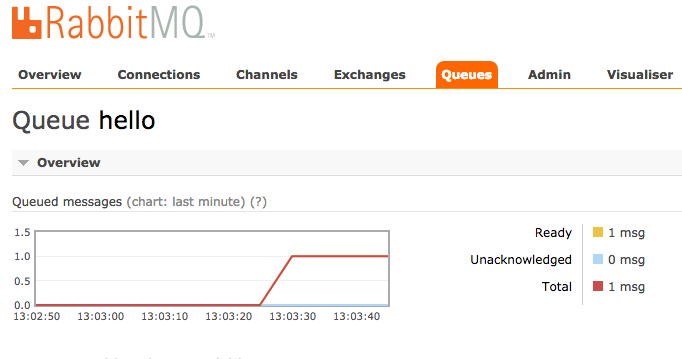
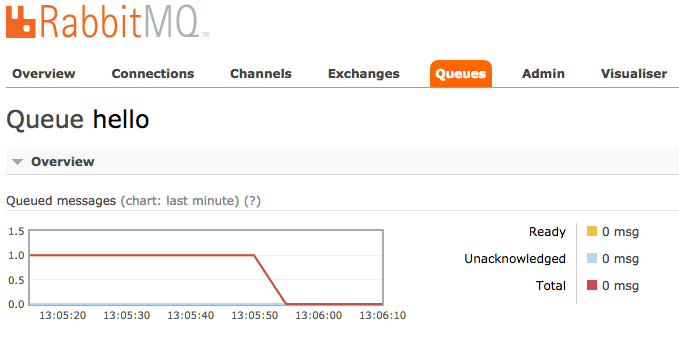
The receiver subscribes to all messages from a named queue. At this point there is a single message waiting to be delivered in rabbitmq in the “hello” queue.
require "bunny"

connection = Bunny.new
connection.start

channel = connection.create_channel
queue = channel.queue("hello")

puts "[\*] Waiting for messages in #{queue.name}. To exit press CTRL+C"
queue.subscribe(block: true) do | delivery_info, properties, body|
  puts " [x] Received #{body}"
  delivery_info.consumer.cancel
end
From the shell:
  λ ruby lib/1-hello/receive.rb
   [\*] Waiting for messages in hello. To exit press CTRL+C
    [x] Received hi
Examples
More fun examples can be found here.