I read an interesting article last night on TDD anti-patterns… It’s a good read and it taught me that as a newbie I am making a lot of classic TDD mistakes…
Here’s an example of a unit test i am currently working on for the Google Desktop Search.
[Test]
public void BuildQuery_ShouldReturnQueryInXmlFormat()
{
  String directory = Environment.SystemDirectory;
  GoogleDesktopQueryBuilder builder = new GoogleDesktopQueryBuilder( );
  Add( Filter.Directory, directory );
  String query = GoogleDesktopQueryBuilder.Build( );
  StringAssert.Contains( "http://127.0.0.1:4664/search&s=", query );
  StringAssert.Contains( XmlFormat, query );
  StringAssert.Contains( Directory, query );
  directory.Replace( ":", "%3A").Replace( "/", "%5C").Replace( " ", "+")
}
From the little research I have done with the Google Desktop Search API I have become a fan. There’s a couple of ways to develop against GDS, one is to download the SDK and import the IDL file and start plugging away. You have to do some silly things like create a GUID for your “plug-in” then ask for a cookie to use for all search requests. I found this approach a little more difficult and not as friendly to .NET. Most of the samples are in C/C++!
The alternative approach was to run the Google Desktop search in a browser, y’know the way it was meant to be used and I quickly recognized a pattern. All searches are stateless! What do i mean by this, well… all searches are done through query string parameters…
http://127.0.0.1:4664/search&s=SFJNMLuPcNAwknyAszkB-ZEL-c0?ie=UTF-8&adv=1&type=cat_files&ot=&file=doc%7Cdocx&ext=&in=C%3A%5CDocuments+and+Settings%5Cmkhan%5CMy+Documents&under=on&to=&from=&domain=&has=GoogleDesktop+&no=&within=86400&day=
So I decided to make use of my friend the “WebClient” class and make a request to http://127.0.0.1:4664 to see what would happen…
Well if you use the “&format=xml” parameter the response is an xml stream with results that look like this…
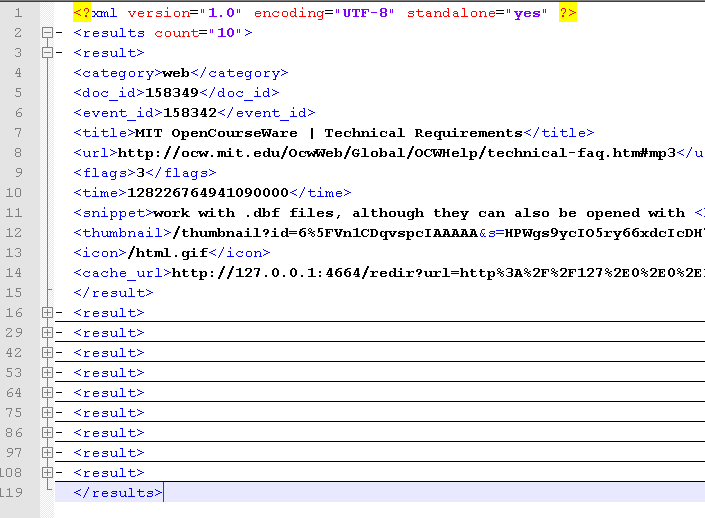
This means a couple of things… I have access to all the different search filters and advanced searches available to Google Desktop Search… this includes search for file types, search within directories, search for x # of files in directory…
If you have any questions please let me know!