Today a colleague and myself had a chance to play with web sockets and the rack hijack. Here’s what we learned.
Below is a bare bones rack application.
# config.ru
require 'rack/handler/webrick'

class Application
  def call(env)
    ['200', {'Content-Type' => 'text/html'}, ['A barebones rack app.']]
  end
end

Rack::Handler::WEBrick.run Application.new
モ bundle exec rackup config.ru
モ curl -s -i http://localhost:8080
HTTP/1.1 200 OK
Content-Type: text/html
Server: WEBrick/1.4.2 (Ruby/2.6.1/2019-01-30)
Date: Sat, 09 Feb 2019 17:27:03 GMT
Content-Length: 21
Connection: Keep-Alive

A barebones rack app.
To upgrade the connection to a web socket connection we need to send a
couple of additional headers in the request. The Connection header
indicates that the client would like to make a protocol change, and the
Upgrade header tells the server that the protocol that the client
would like to upgrade to is a websocket.
"Connection: Upgrade"
"Upgrade: websocket"
To get curl to initiate a web socket connection we can send the
following request to the server.
モ curl -i -s \
  --header "Connection: Upgrade" \
  --header "Upgrade: websocket" \
  --header "Sec-WebSocket-Key: SGVsbG8sIHdvcmxkIQ==" \
  --header "Sec-WebSocket-Version: 13" \
  http://localhost:8080/

HTTP/1.1 200 OK
Content-Type: text/html
Server: WEBrick/1.4.2 (Ruby/2.6.1/2019-01-30)
Date: Sat, 09 Feb 2019 17:38:03 GMT
Content-Length: 21
Connection: Keep-Alive

A barebones rack app.
At the moment the server is ignoring our web socket upgrade request and returning a response immediately. In order to get our server to handle a web socket upgrade request we will need to look at the rack hijack API.
<tt>rack.hijack?</tt>:: present and true if the server supports
                        connection hijacking. See below, hijacking.
<tt>rack.hijack</tt>:: an object responding to #call that must be
                       called at least once before using
                       rack.hijack_io.
                       It is recommended #call return rack.hijack_io
                       as well as setting it in env if necessary.
<tt>rack.hijack_io</tt>:: if rack.hijack? is true, and rack.hijack
                          has received #call, this will contain
                          an object resembling an IO. See hijacking.
Additional environment specifications have approved to
standardized middleware APIs.  None of these are required to
be implemented by the server.
The spec is pretty self explanatory so let’s update our rack app to
support a web socket connection. We will also switch to puma because at
the time of this writing WEBrick does not fully implement the hijack API
as described here.
# config.ru
require 'rack/handler/puma'

class Application
  def call(env)
    if env['rack.hijack?']
      env['rack.hijack'].call
      io = env['rack.hijack_io']
      Thread.new do
        loop do
          sleep 5
          io.write("[#{Time.now.to_i}] I'm awake...\n")
        end
      end
    else
      ['200', {'Content-Type' => 'text/html'}, ['A barebones rack app.']]
    end
  end
end

Rack::Handler::Puma.run Application.new
We’re going to write a response to the client every 5 seconds from a background thread to simulate server to client push messages.

This is pretty neat, we now have a persistent connection with the server
that allows the server to dispatch messages to the client whenever it
wishes to. We can take this a little bit further by connecting the web
socket connection to a redis subscription.
# config.ru
require 'rack/handler/puma'
require 'redis'

class Application
  attr_reader :redis

  def initialize
    @redis = Redis.new
  end

  def call(env)
    if env['rack.hijack?']
      env['rack.hijack'].call
      io = env['rack.hijack_io']
      redis.subscribe("ruby") do |on|
        on.message do |channel, message|
          io.write(message)
        end
      end
    else
      ['200', {'Content-Type' => 'text/html'}, ['A barebones rack app.']]
    end
  end
end

Rack::Handler::Puma.run Application.new
When we receive a message published to a channel named ruby from redis
we will dispatch that message directly to the connected web socket
connection.
To complete the example we need something to publish to the redis
channel. Below is a tiny client that will publish messages to redis.
# publisher.rb

require 'redis'

redis = Redis.new
5.times do
  sleep 5
  redis.publish("ruby", "[#{Time.now.to_i}] I love ruby\n")
end
First we need to start the web socket connection using curl. Then we will start publishing messages using the publisher script.

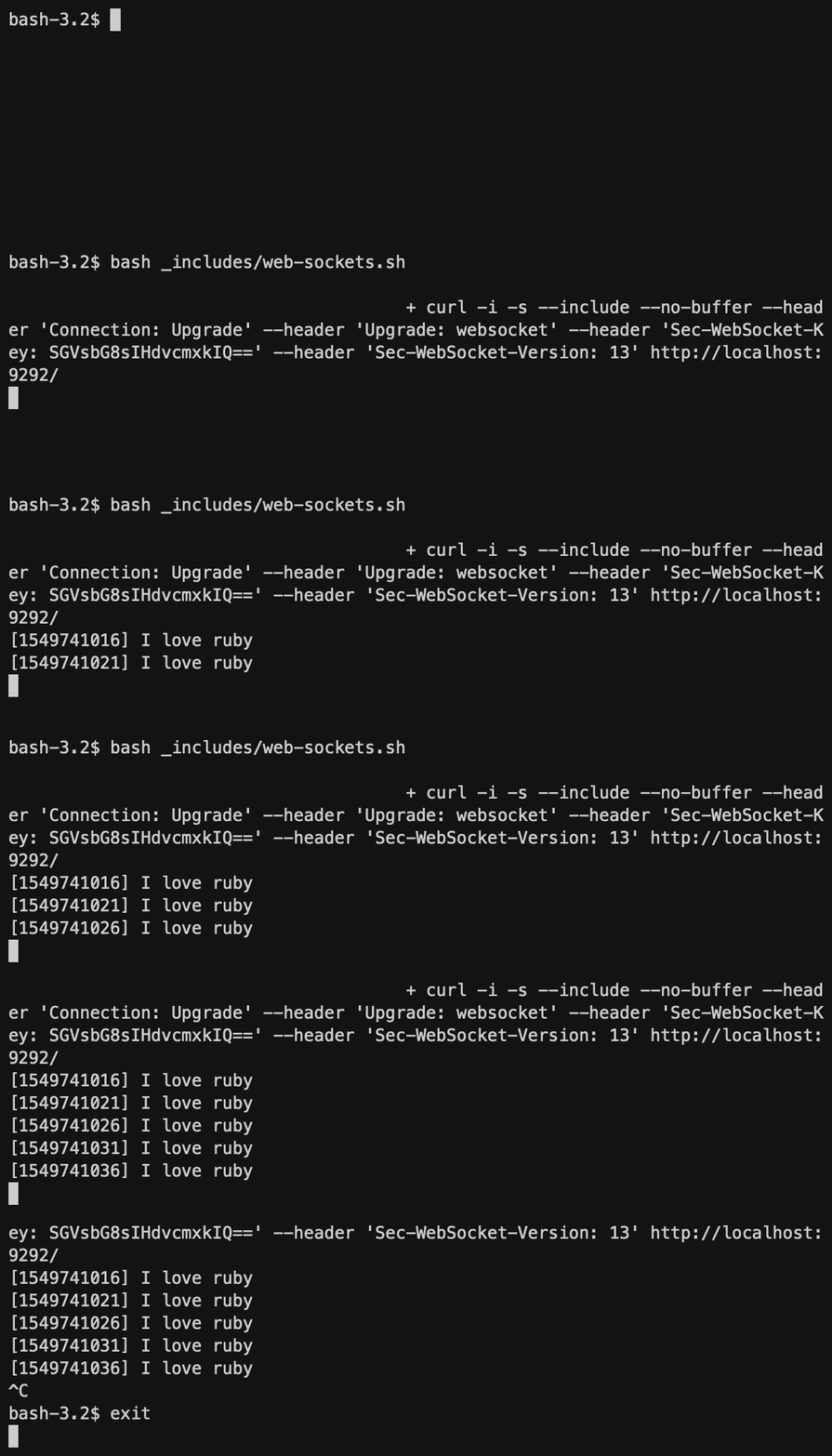

We have built a minimal server side implementation of what Action Cable provides us. The next step is to replace the curl client with a minimal JavaScript client. I leave that as an exercise for the reader.
The full source can be cloned from here.