Google just released a brand new experimental API that lets you integrate dynamic search right in to your own web site. They have made this API so easy to use it really takes only a few minutes to implement, and the results can look professional and polished.
One of the greatest things so far about this API is the CSS control that it offers. This allows you to render your search control in the manner in which you would like it displayed. I also really like the tabbed search views offered and being able to create custom tabs. This allows you to add a “Site Search” tab to your search.
I would like to be able to control the number of search results returned, and add the ability to navigate back and forth through search results, similar to Google’s own search page.
My original implementation was based on the example HTML page given when you generate a new AJAX search API key.
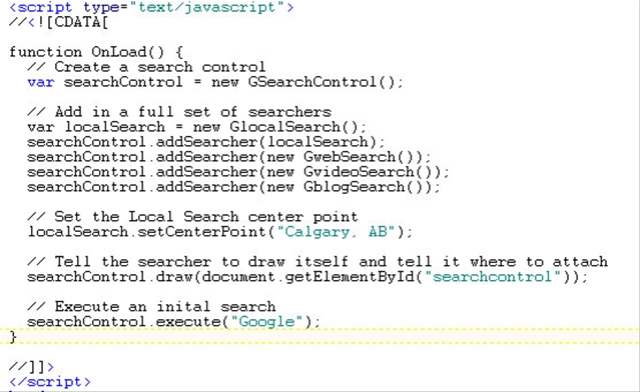
Lets take a look at the OnLoad function. This function is called as soon as
the page loads, because the onload event is added to the <body>
element . <body onload="OnLoad()">
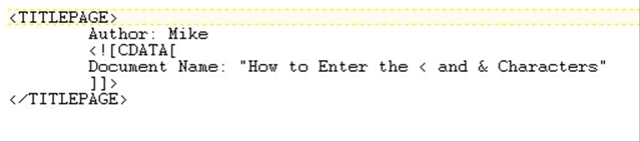
"CDATA sections - A CDATA section is a block of text in which you can freely insert any characters except the string ]]>. Here's an example of a CDATA section in an element:" - sourced from "Step by Step XML" by Michael J. Young
The “OnLoad” function then instantiates a “GSearchControl” object. This object is a container for the Google Search interface. Next you must add “searcher children” to the “GSearchControl” object. In the above example we have added 4 children. The local search, web search, video search and blog search “children”.
For the local search child we set our center point or local reference to the city we wish to reference. In my case it is Calgary, Alberta. Next, we bind the “searchControl” to an html container using the “draw()” function.

In the above OnLoad function the searchControl binds to an HTML
container titled “searchControl”. In the body of our HTML page we created a
simple div tag with an ID of “searchControl”. When the search control
renders it will update the content of this div element.
It is very simple to implement, and now you can customize your search control using CSS and the other API classes available.