AJAX, shorthand for Asynchronous JavaScript and XML, is a Web development technique for creating interactive web applications. The intent is to make web pages feel more responsive by exchanging small amounts of data with the server behind the scenes, so that the entire web page does not have to be reloaded each time the user makes a change. This is meant to increase the web page’s interactivity, speed, and usability.” - Wikipedia
There are 3 main components in my AJAX implementation. The client side JavaScript and HTML, and the server side AJAX call processor. For this articles I am going to discuss how I implemented the blog page on this site using AJAX.
Client Side
If you check the source code behind my blog page you may notice 2 script files were included. These are “ajax_obj.js” and “getEntry.js”. The “ajax_obj.js” file creates an instance of the “XMLHttpRequest” object for non Microsoft browsers and an “ActiveXObject” for Microsoft web browsers. This object is pretty cool, it’s the basis for almost all AJAX technology. Learn it, understand it and AJAX will become a breeze.
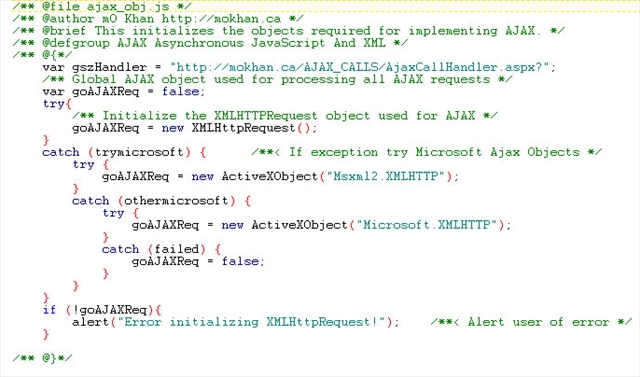
The 2nd js file, “getEntry.js” performs the interaction between my web server and the client machine (You’re the client by the way!). What it does is sends a request to my server for my latest blog entry, my server takes the request and returns just the blog entry. Duh!
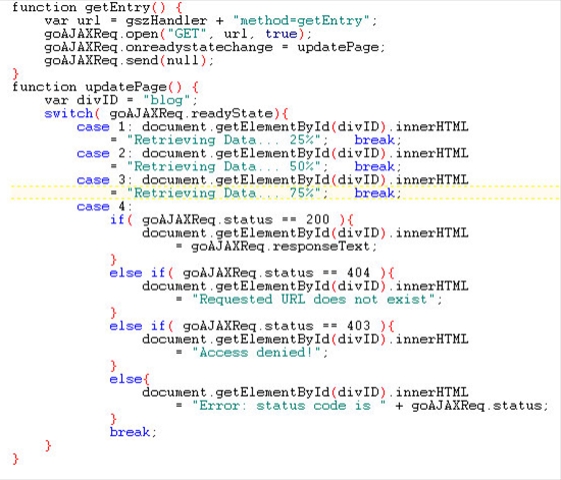
But how does it do this? Using the XMLHttpRequest or ActiveXObject object
instantiated in the ajax_obj.js file we use 4 methods/properties. To make
this easy let’s call this guy “goAJAXReq”, short for global AJAX request
object.
- open: This specifies what type of request I would like to make the server, and what URL to call.
- onreadystatechange: This specifies a “callback” function to handle the servers response to my request. The callback is basically a function created in order to receive the call back. It’s like leaving a voicemail message on your buddy’s phone and telling him to call you back at this number when he gets the message.
- send: This tells the “goAJAXReq” to send the request to the server. Kind of like picking up the phone to call your buddy. Except like me your buddy never answers the phone so you’ll have to leave a message.
- status: This tells you the status of your request so far. It’s actually and HTTP status, and would be similar to an operator message. “This number cannot be reached. Please try again!” If you don’t get this message most people here a “Hello!?” on the other end. The “Hello” is a 404 status. The operator message is like the HTTP 200 or 404 status.
The getEntry() function dials the phone number, leaves a message with a “callback” number and pressed # to send the message.
The updatePage() is the number the buddy can call me back at. So when buddy calls
me I answer at this number and he gives me the info that I need. When I
receive my blog entry back from my server I search for an HTML element on the
page called “blog”. This is defined as a <div> tag, and I write the
data returned back to me in this element. Voila, that’s the AJAX on the
client side. Now you can go into a lot more detail with how you would like
your data sent to you, and how you would like it packaged and unpackaged. But
for this example, my call returned straight forward HTML for my blog entry.
Server Side
The server side implementation can be done in so many different ways. Most of the AJAX articles I found on the net used PHP, for this example I am using ASP.NET. The key component in my implementation is the use of “reflection”. My AJAX object “goAJAXReq” sends the method name it wishes to run at the server to return the data it wants. In this example the method was “getEntry”. Using reflection I parse out the value for the method variable and call that function. This function grabs my latest blog entry, makes sure its valid HTML and returns the data to the client.
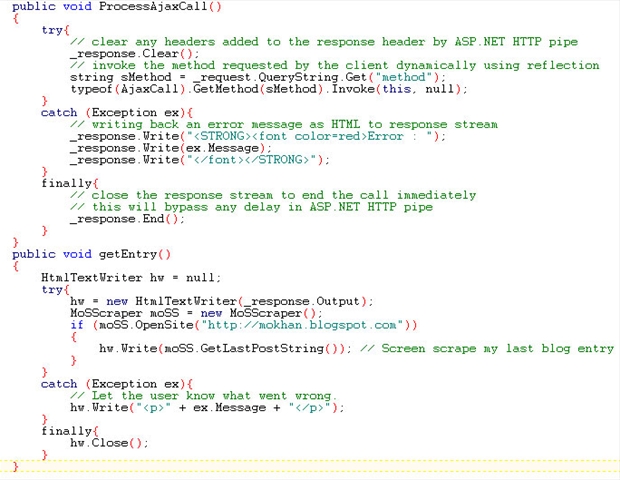
In my AJAX call class I parse out the value for the “method” variable from the request stream. I am using the “method” variable to contain the name of the method I want to invoke. In this example the request stream is sending “method=getEntry”. This means the request stream wishes to process the “getEntry” method on the server. After parsing our the “getEntry” name I use reflection to call that method. My “getEntry” method grabs my latest blog entry and writes it directly to the “response” stream. This is what carries the data being transferred back to the client.
Voila! My AJAX call processor is complete.